Mercury
A calmer, privacy-conscious intelligence layer for Gmail
Mercury is a full-stack email organization workspace built to help people understand a crowded Gmail inbox without becoming another email client. It organizes recent conversations into personalized categories, writes clearly labeled AI summaries, and highlights possible actions such as reviewing, replying, paying, scheduling, or reading.
Open the live Mercury application to explore the current Azure-hosted build.
Staging access: The public landing page is available to everyone, but Google sign-in is currently restricted to approved test users. The server sleeps when inactive to reduce hosting costs, so the first request may take up to one minute to start.
The central product decision is restraint: Mercury can help a user decide, but it cannot act on the user's behalf. Gmail remains the source of truth for messages, labels, conversation membership, and unread state. Sending, replying, forwarding, deleting, archiving, and opening attachments all remain in Gmail.
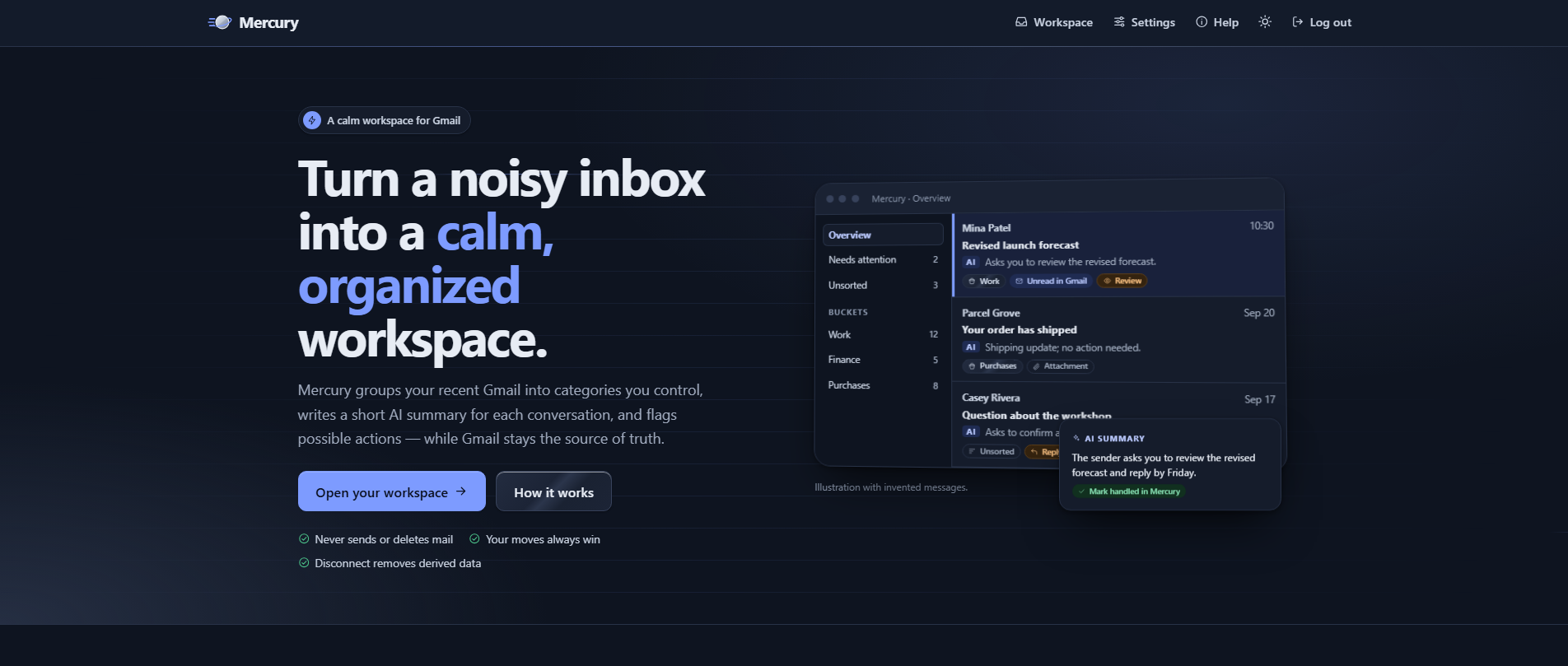
Mercury's dark-themed landing page introduces the product as a calm, organized workspace for Gmail and makes its safety boundaries visible before a user connects an inbox.
The landing page establishes Mercury's purpose before asking for mailbox access. The interface pairs a preview of categorized conversations with three explicit promises: Mercury never sends or deletes mail, manual organization always wins, and disconnecting removes Mercury's derived mailbox data. This makes the application's privacy and control model part of the product experience rather than fine print.
The problem: inbox overload without over-automation
Email assistants often pursue convenience by requesting broad permissions or automating consequential actions. Mercury takes a narrower approach. It indexes a bounded window of up to 2,000 recently active threads from the previous 180 days, then adds an organization layer on top of Gmail.
That layer includes:
- Concise summaries and conservative possible-action signals.
- Semantic categories called buckets.
- One-level groups of related buckets called crates.
- Exact-sender rules for predictable filing.
- Open, handled, and dismissed action states that change Mercury only.
- An intentional Unsorted destination when confidence is too low.
The system stores selected metadata and derived information needed for organization, including subjects, senders, summaries, action signals, and embeddings. It does not persist full message bodies or raw MIME content.
The main workspace
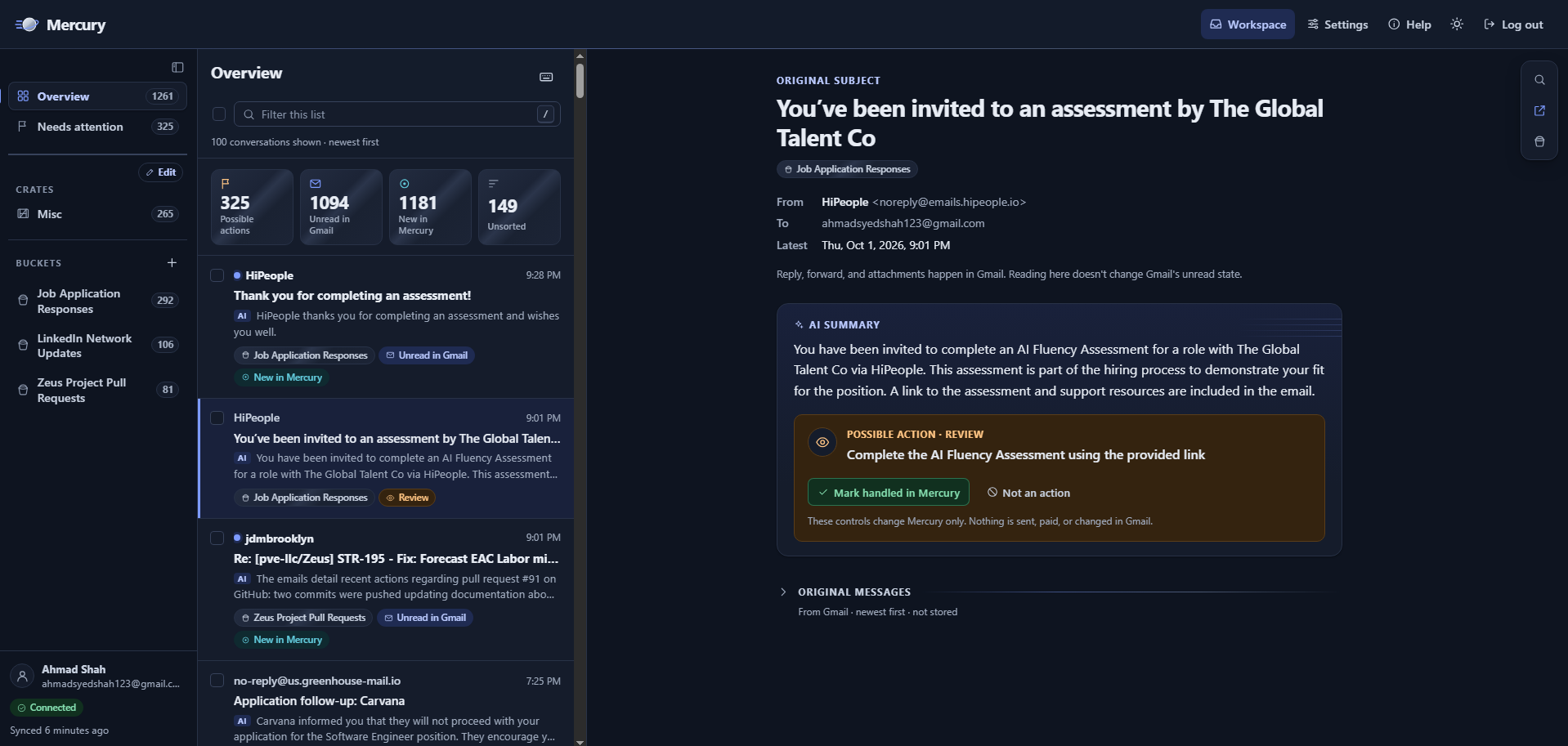
Mercury's desktop workspace shows category navigation on the left, a filterable conversation list and inbox metrics in the center, and a safe read-only conversation view with an AI summary and possible action on the right.
The primary workspace turns inbox review into a three-part flow:
- Choose a scope. The sidebar exposes the overview, conversations needing attention, crates, and individual buckets with counts.
- Scan with context. The center column combines sender, subject, summary, category, unread status, and possible-action labels so a user can triage without opening every thread.
- Inspect without side effects. The reader shows the selected thread's metadata, AI summary, and a clearly separated possible action. Marking an item handled affects Mercury only; it does not send a message or change Gmail's unread state.
When a user opens the original messages, Mercury fetches the current conversation from Gmail on demand. It prefers plain text, converts HTML-only mail into inert text, removes scripts, remote content, attachments, and binary parts, and renders the result through Jinja autoescaping. Replies and attachments are deliberately handed back to Gmail.
On smaller screens, the reader becomes its own page instead of compressing all three regions. HTMX progressively enhances ordinary links and forms, while keyboard navigation, bulk selection, drag-and-drop, theme switching, undo actions, and focus restoration are implemented with vanilla JavaScript. Every drag-and-drop workflow also has a keyboard-accessible form alternative.
Organization that preserves user intent
Mercury represents each conversation with a 512-dimensional embedding stored through pgvector. CPU-based similarity analysis and clustering help create and maintain useful categories, but automated placement is deliberately conservative.
The precedence model is simple:
- Manual user placement.
- Exact-sender rule.
- Strong semantic match.
- Unsorted.
Automated classification requires both an absolute similarity threshold and a clear margin over the next-best bucket. Manual and rule-based placements are never moved by the model. Critical database updates repeat this protection in their SQL conditions so a user action made while an AI job is running still wins.
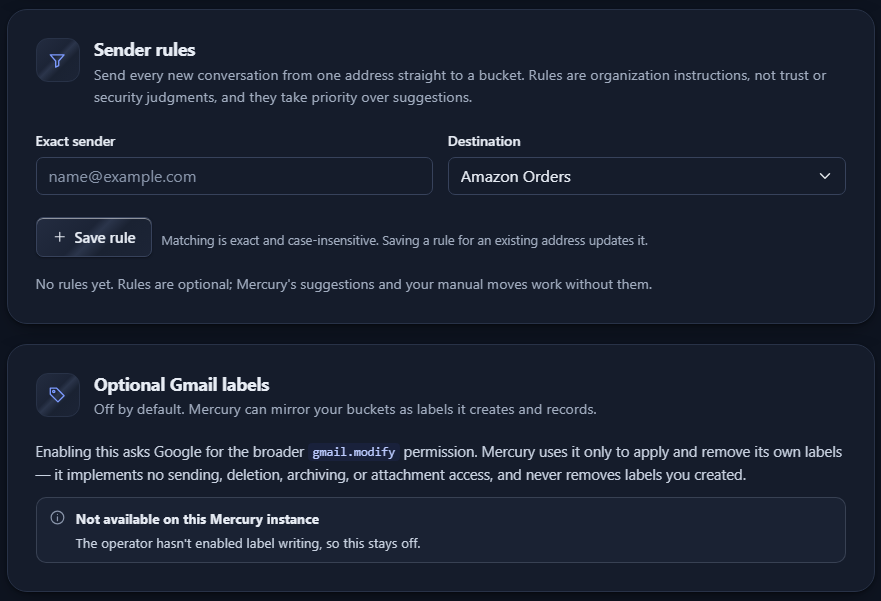
Mercury settings provide an exact-sender rule that routes future conversations to a chosen bucket, alongside an optional Gmail-label integration that clearly explains its broader permission and current availability.
Sender rules give users a deterministic alternative to AI classification. The settings view explains that matching is exact and case-insensitive and that rules take priority over suggestions. Gmail label mirroring is separate and off by default because it requires the broader gmail.modify scope; when enabled, it is limited to Mercury-owned labels and cannot send, delete, archive, or access attachments.
Buckets and non-destructive crates
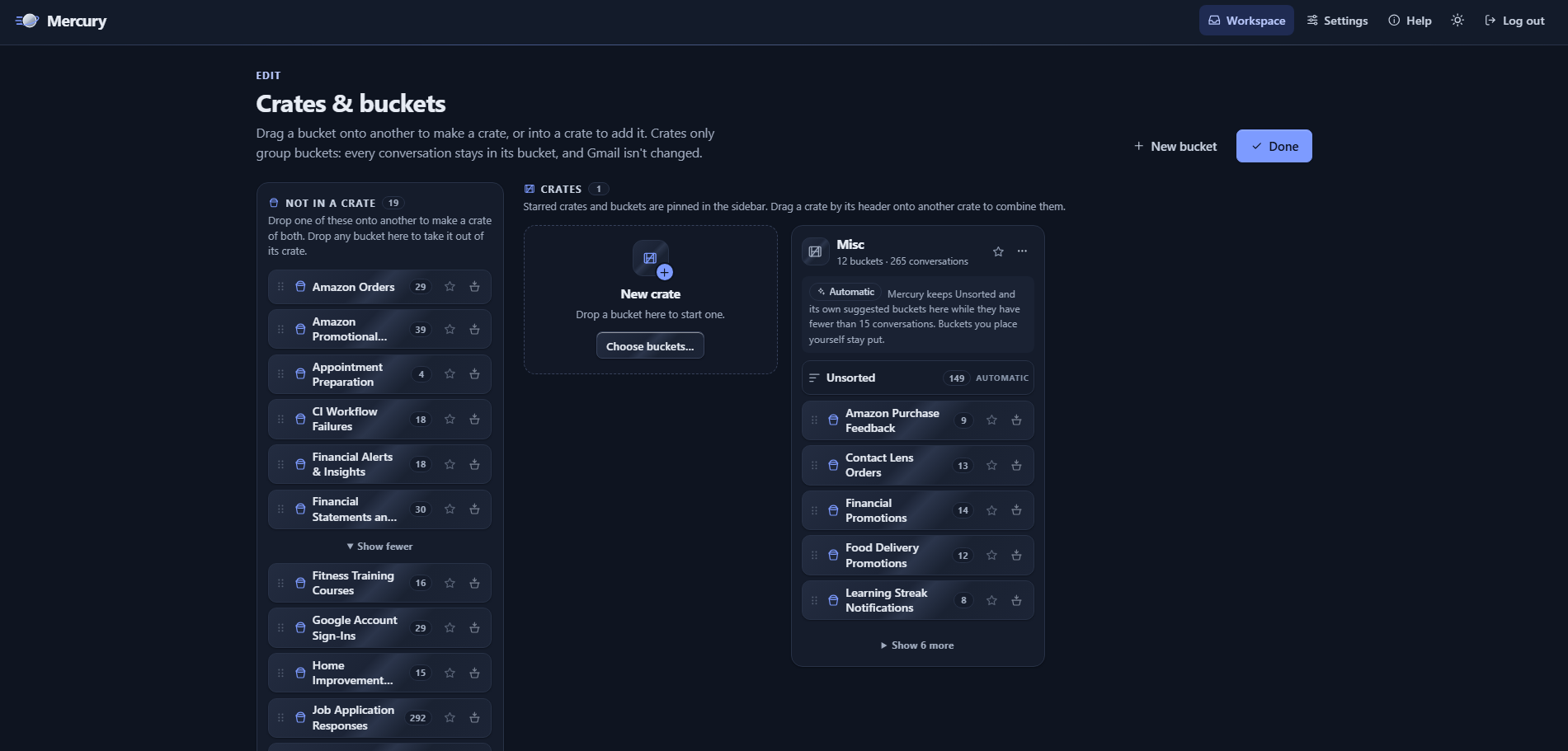
The Crates and buckets editor lets users create, arrange, favorite, and archive buckets, or group several buckets inside a crate without changing the conversations' underlying assignments or Gmail data.
A bucket is the single primary category assigned to a conversation. A crate is only a one-level grouping of buckets, so reorganizing the navigation never changes a conversation's assignment, its embedding, a sender rule, or anything in Gmail. Users can drag one bucket onto another to start a crate, move buckets between groups, or use equivalent standard controls.
The special Misc crate holds small AI-created categories until they grow large enough to stand alone. It may reorganize model-created buckets, but it will not move a bucket that the user placed manually. This avoids the destructive category-merging behavior common in automated organization systems.
AI with explicit boundaries
For eligible conversations, Mercury can generate a short summary, a possible-action type, an optional action description, and an explicitly stated due date. Every result records its model, prompt version, and content version so stale output can be detected when a thread changes.
AI calls are constrained by:
- Strict Pydantic response schemas.
- Structured OpenAI Responses requests with provider storage disabled.
- No tools or autonomous email actions exposed to the model.
- Per-account daily thread and monthly cost limits.
- A global monthly cost limit.
- Atomic budget reservations followed by actual-usage reconciliation.
- A numerical usage ledger that stores token and cost totals without prompts or provider responses.
The provider adapter supports the OpenAI API and allowlisted Azure OpenAI or Azure AI Foundry endpoints. Ambiguous messages remain Unsorted instead of being forced into a category.
Architecture and durable processing
Mercury is a modular monolith: one Flask codebase and Docker image run as separate web and worker roles around one PostgreSQL database.
- The web role handles authentication, CSRF validation, owner-scoped queries, server-rendered pages, short database operations, job enqueueing, and bounded on-demand Gmail reads.
- The worker role handles indexing, incremental Gmail synchronization, summaries, embeddings, semantic organization, retries, reconciliation, watch renewal, and retention work.
- PostgreSQL and pgvector store relational state, vector data, AI accounting, and Procrastinate's durable job queue, avoiding a separate Redis or Celery service.
- Provider adapters isolate Gmail, Google OAuth, Pub/Sub, OpenAI, and synthetic demo implementations from domain logic and templates.
Web and worker processes do not communicate directly. PostgreSQL is their durable coordination point, with account-level locks, duplicate-job coalescing, capped exponential backoff, provider-aware retry handling, worker heartbeats, abandoned-job recovery, and reconciliation for database writes that commit before enqueueing succeeds.
Privacy and security engineering
Security is part of Mercury's architecture rather than a final hardening step. Important controls include:
- Separate Google sign-in and explicit Gmail authorization, with read-only Gmail access by default.
- Browser-bound, single-use OAuth attempts protected by state, nonce, and PKCE.
- MultiFernet encryption for provider credentials with key rotation support.
- User ownership checks before provider access and composite database constraints that prevent cross-account relationships.
- CSRF protection for browser mutations and signed OIDC verification for the Pub/Sub webhook.
- Strict Content Security Policy, trusted-host validation, secure cookies, HSTS, frame denial, MIME sniffing protection, and private no-store caching.
- Logging rules that exclude subjects, bodies, snippets, summaries, prompts, cookies, tokens, and raw provider payloads.
- Queue payloads restricted to internal identifiers and version numbers.
- Production startup checks that fail closed on development keys, fake providers, insecure origins, weakened cookies, manual-only synchronization, or unverified database TLS.
Mercury does not claim to be zero-knowledge or end-to-end encrypted. Selected message text may be processed by the configured AI provider after consent, and the application stores email-derived metadata needed to organize a mailbox. Those limits are stated directly rather than hidden behind broader privacy language.
Quicksilver design system
The interface uses a design system named Quicksilver, built around “quiet speed”: silver-gray surfaces, dark ink typography, a restrained blue accent, generous spacing, subtle metallic gradients, and a planet-and-orbit mark. It supports light and dark themes, reduced motion, responsive layouts, and success, warning, and error states that do not rely on color alone.
The visual hierarchy mirrors the product hierarchy. Summaries are explicitly marked as AI output, possible actions are visually separated from message content, and controls repeatedly state whether they affect Mercury or Gmail.
Testing, deployment, and current status
The repository includes 156 test functions across unit, integration, security, acceptance, and browser suites. Coverage includes OAuth and cross-user authorization, CSRF, token rotation, safe MIME parsing, AI schemas and budgets, mailbox pagination, history synchronization, queue privacy, worker crash recovery, semantic organization, manual-choice preservation, responsive flows, and account deletion.
CI runs linting and formatting checks, a PostgreSQL-backed test suite, static security analysis, dependency and secret scanning, container builds, and image vulnerability scanning. The production design targets Azure Container Apps, Azure PostgreSQL with pgvector, Azure Container Registry, private database networking, managed identity, immutable image digests, Doppler-managed configuration, and GitHub Actions authentication through Azure OIDC.
Mercury is a substantial working implementation with a fully tested synthetic demo that needs no Google or AI credentials. Google OAuth, Gmail, Pub/Sub, OpenAI or Azure OpenAI, Doppler injection, and Azure infrastructure are implemented in production-shaped form but still require final verification with live provider credentials. The project does not claim Google approval, a completed formal security assessment, or a currently production-verified Azure deployment.
What this project demonstrates
Mercury explores how to build useful AI around uncertainty, cost, privacy, and user authority. Its strongest engineering choices are intentionally unglamorous: bounded data collection, conservative classifications, explicit provenance, durable recovery, ownership checks before external calls, and an Unsorted state that admits when the model is unsure.
The result is an email intelligence layer that helps people understand what deserves attention while keeping consequential actions—and the final say—with the user.